Grocery List App
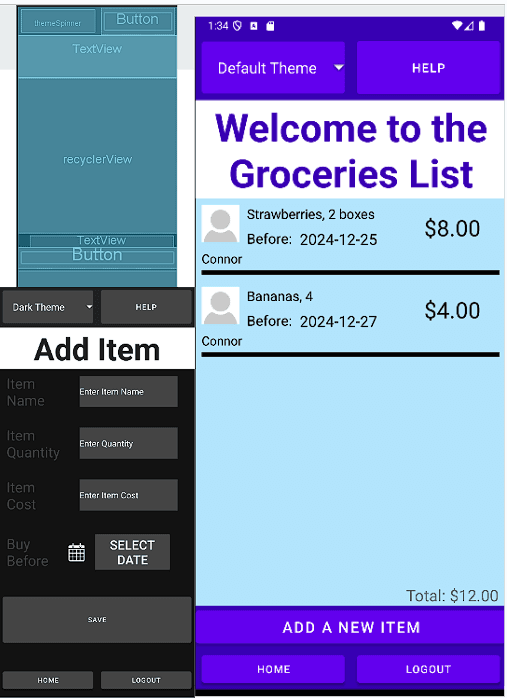
A grocery list app that helps you manage, share, and organize your grocery shopping with seven interactive screens. It features dynamic theme selection and integrates Firebase for real-time data storage and syncing.
Features:
- Manage and share grocery lists with others
- Dynamic theme selection for personalized user experience
- Real-time data synchronization with Firebase
- Responsive design for all devices
Technologies Used:
- Android XML for UI design
- Firebase for real-time data storage
- Kotlin and Java for app logic and functionality
- Android Studio for development and testing using a virtual device
- Collaborative testing and debugging
Technology Overview:
The Grocery List app leverages several technologies and features to provide an efficient and responsive user experience:
- Smooth UI Experience: Using Android XML for UI design, the app ensures a visually appealing and responsive layout across devices.
- Firebase Integration: The app stores all data such as item details, quantity, cost, and dates in Firebase. It also supports user login and theme management.
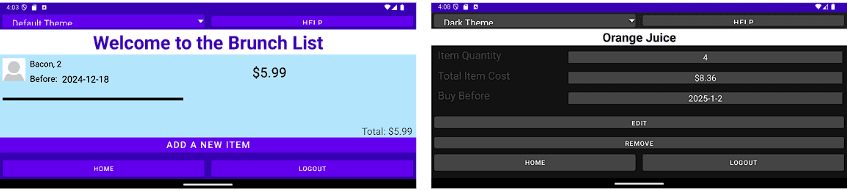
- Theme Management: Users can select and store a preferred theme using SharedPreferences. The theme persists across sessions and orientation changes.
- Data Storage & RecyclerView: A custom `GroceryItem` data class is used to manage item details. The app employs a `RecyclerView` adapter to display a list of grocery items dynamically.
- Item Details & Editing: Users can add, edit, and view item details. Intents are used to pass data between activities for seamless navigation.
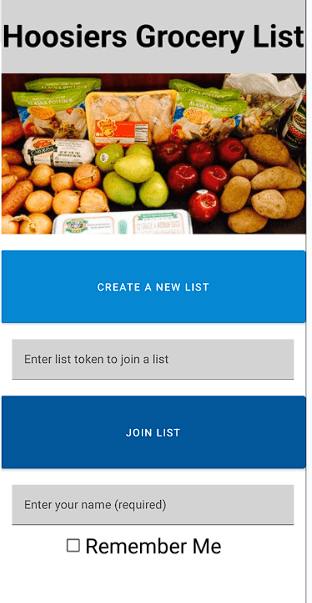
- List Creation & Sharing: Users can create new grocery lists or join existing ones using a unique token. This is supported by Firebase's database querying capabilities (e.g., `.whereEqualTo()`).
- Persistency: User inputs like theme selection and list information are stored to ensure data is preserved even when the app is closed or the device is rotated.
- Real-Time Feedback: The app provides users with immediate feedback on their actions using Toast messages for adding items or changing themes, ensuring a responsive and interactive experience.